

A CRM platform that costs six figures a year fails for a reason that has nothing to do with the platform: the org was built by someone whose tools ran out three requirements ago, and nobody noticed until the integration broke in production. That is the real cost of getting the Salesforce developer vs admin question wrong, and it is almost never diagnosed as a hiring mistake. It gets logged as a Salesforce problem. Teams that hire Salesforce CRM developers without knowing where that boundary sits end up paying twice once for the wrong skill set, then again for the rebuild.
The two roles are not seniority tiers. An admin is not a junior developer, and a developer is not an admin who learned to code. They operate on opposite sides of a hard technical boundary, the point at which the platform’s declarative tooling stops being able to express what you need, and someone has to write, test, and deploy Apex. Most buyers do not know where that line sits, so they hire the wrong role, then blame the outcome on the person.
IDC projects the Salesforce economy will generate a net gain of 11.6 million jobs and $2.02 trillion in new business revenues between 2022 and 2028, with the talent gap named as one of the top barriers to organisations capturing that value.
That talent gap is the reason this decision is expensive. Demand for people who can do genuine Apex development is rising faster than the supply of people who can prove it, which means the market is now full of profiles that look identical on paper same certifications, same tool lists, same “8 years on the platform” and perform nothing alike in a production org with three managed packages and 40 million activity records.
This guide draws the capability line precisely, then walks the entire hiring process end to end: scoping, vetting, contracting, onboarding, delivery management, and scale or exit. It is written for the person who has to make the call and does not have a Salesforce architect on staff to ask.
TL;DR
This is a practitioner's guide to the difference between a Salesforce admin and a Salesforce developer, and how to hire the right one. It is for CTOs, engineering managers, RevOps leads and founders who own a Salesforce org but do not have deep platform expertise in-house to lean on.
Here is the number that matters most. The declarative-versus-code boundary is not a preference, it is a hard limit. A single Salesforce transaction allows 100 SOQL queries and 150 DML statements, and once your logic crosses that ceiling, no amount of admin skill can fix it. Meanwhile the cost gap between the two roles runs 2–3x, and hiring the senior version of the wrong role is the most expensive mistake in this category.
By the end you will be able to classify any Salesforce requirement as admin work, developer work, or architect work in under five minutes; run a technical screen without being technical yourself; quote realistic cost bands in ₹ and $; and know what a good first 30 days looks like when you hire Salesforce CRM developers for the first time. Salesforce customization decisions get much cheaper when you know which side of the line they fall on.
What Is a Salesforce Developer?
A Salesforce developer is a platform engineer who extends Salesforce beyond its configuration limits by writing code Apex classes and triggers, Lightning Web Components, and API integrations then testing and deploying that code through version-controlled release pipelines. They own everything the point-and-click tools structurally cannot express.
What the role is commonly confused with, and should not be:
- Not a senior admin. Administration and development are different disciplines with different certification tracks, different failure modes, and different day-to-day tools. Seniority in one does not imply competence in the other.
- Not a Salesforce consultant. A consultant translates a business process into platform design and often never touches an IDE. A developer implements. Many engagements need both, and buying one while needing the other is a common and costly substitution.
- Not a full-stack web developer who happens to know Salesforce. Apex looks like Java, but the constraints governor limits, the order of execution, and the multi-tenant sharing model are unique. Strong general engineers routinely write Apex that passes review and collapses under real data volume.
Why the Distinction Is Worth Money
Getting the role right is not an org-chart nicety. It changes four measurable things.
- Cost per outcome. Admin capacity in India typically runs ₹4–12 lakhs/year; a certified developer with real Apex depth runs ₹12–35 lakhs/year. Paying developer rates for work that Flow Builder handles in an afternoon wastes 40–60% of that premium. The reverse of an admin brute-forcing an integration through scheduled flows produces something that has to be rebuilt within 12–18 months.
- Speed to first release. Configuration changes ship the same week. Coded changes need test classes, a sandbox path, code review and a deployment window. Teams that plan an admin timeline for developer work slip their first release by 3–6 weeks, every time.
- Technical debt accumulation. Declarative automation carries no test coverage requirement, no compile-time checks and, until you deliberately add it, no version control. This is why over-configured orgs degrade quietly: nothing fails a build, because there is no build.
- Risk exposure. Apex written without field-level security enforcement or with string-concatenated SOQL creates data-leakage and injection vectors that no admin control catches. Security is where the wrong hire stops being an efficiency problem.
Market direction reinforces the pressure. Statista forecasts worldwide CRM software revenue reaching $103.51 billion in 2026 and $139.56 billion by 2031, while Gartner projects overall IT spending at $6.37 trillion in 2026, up 14.2% meaning more spend flowing into platforms that most organisations are still staffing with a single overloaded admin.
The organisations that hire Salesforce CRM developers deliberately, against a written capability brief, are the ones converting that spend into working automation.
The Core Problem: Buyers Diagnose Capacity, Not Capability
The failure pattern is consistent enough to be predictable. A team has a Salesforce org and one admin. Requests queue up. Leadership reads the backlog as a capacity problem and hires a second admin or, worse, promotes the existing one and calls the role “Salesforce Developer” without changing what that person can actually do.
What breaks, with specifics:
- Automation sprawl. An org that started with three record-triggered flows ends up with 15–40 across its core objects, several firing on the same object with no controlled execution order. Debugging time per incident grows from minutes to half-days.
- Silent CPU-limit failures. Synchronous transactions get 10 seconds of Apex CPU time. Stacked flows plus a managed package trigger routinely exceed it and the error surfaces to end users as a safe failure, not as an architecture warning.
- Integration by spreadsheet. Without callout capability, dedicated teams fall back on scheduled exports and manual imports. We see this most in finance and reconciliation workflows, where it survives audit exactly once.
- The 3-4x scoping error. Teams consistently underestimate coded work by 3–4x because they price the happy path only. A “simple” two-way sync is not one build; it is authentication, field mapping, error handling, retry logic, idempotency, logging, and a reconciliation report. Five of those six are invisible in the original ticket.
- Zero deployment discipline. If the answer to “how do you deploy?” is “change sets,” there is no repository, no branching model, and no rollback. Every release is a manual, unrepeatable event.
The tell: if your Salesforce backlog contains the words “sync,” “calculate across objects,” “custom screen,” “bulk,” or “external system,” you have developer work sitting in an admin queue and adding admin hours will not clear it.
The Capability Line: 9 Things Only a Developer Can Do
This is the section to screenshot. Everything below is structurally unavailable through configuration, regardless of how skilled the admin is.
- Apex triggers and classes with transaction control. Complex conditional logic, recursion guards, custom exception handling, and rollback via savepoints. Flow cannot manage a partial-failure rollback across multiple objects reliably.
- Asynchronous and high-volume processing. Batch Apex, Queueable with chaining, and @future methods to process millions of records within limits. Scheduled flows cannot chain jobs or handle stateful batching.
- Governor-limit engineering. Bulkification, selective SOQL, custom indexes, and skinny tables for large data volumes. Only code can be refactored; declarative automation can only be deleted and re-thought.
- Custom UI beyond App Builder. Lightning Web Components for interactive interfaces multi-step wizards, custom data grids, third-party JavaScript libraries loaded via static resources. Dynamic Forms are flexible; they are not a component framework.
- Real integration. REST and SOAP callouts with Named Credentials, OAuth flows including JWT bearer, Platform Events and Change Data Capture for event-driven architecture, Bulk API 2.0 for volume, and middleware orchestration through MuleSoft. External Services covers a narrow slice of this; the rest requires code.
- Programmatic security enforcement. Enforcing CRUD and field-level security inside Apex, stripInaccessible, user-mode database operations, injection-safe dynamic SOQL, and deliberate with sharing / without sharing decisions. Getting this wrong is how orgs leak data while every permission set looks correct.
- Test automation and coverage. Apex unit tests with mocked callouts and test data factories, meeting the platform’s 75% coverage requirement for production deployment. There is no equivalent test framework for declarative automation.
- Source-driven release management. Salesforce DX, scratch orgs, unlocked and managed packages, Git-based branching, and CI/CD through tools like Gearset or Copado. This is the difference between a repeatable pipeline and a person clicking through change sets on a Friday.
- Packaged and AI-extended products. AppExchange products that must pass security review, and custom Apex invocable actions that ground Agentforce agents or Data Cloud logic in your own business rules.
Where an admin is the right and cheaper answer: object and field creation, page layouts and Dynamic Forms, validation rules and formula fields, roll-up summaries, record-triggered and screen flows for linear business logic, approval processes, permission sets and sharing rules, reports and dashboards, duplicate and assignment rules, data loads, sandbox refreshes, and licence management.
Core Salesforce admin responsibilities cover the large majority of day-to-day change requests in a healthy org usually 70–80% of ticket volume. Hiring a developer to do this work is not just expensive; it is also the fastest way to lose a good developer. Read those nine items as the real specification to hire Salesforce CRM developers against a tool list on a CV is not one.
The Full Walkthrough: How to Hire Salesforce CRM Developers
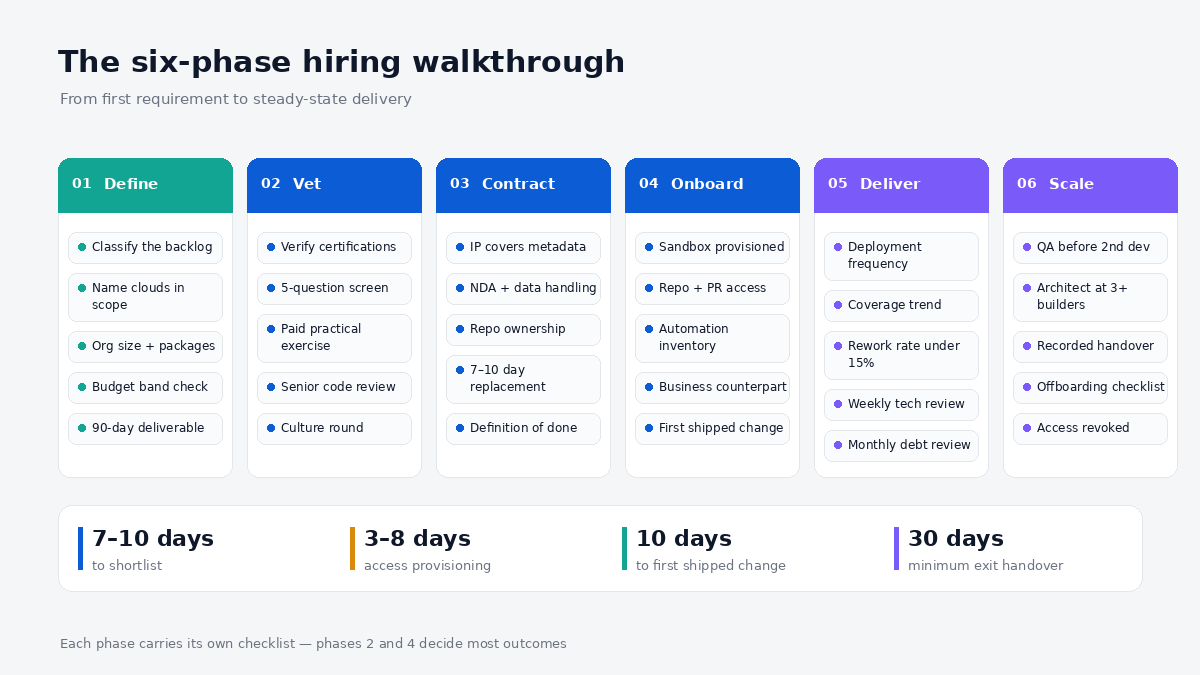
Six phases, in order. Each one has a checklist you can lift directly into your own process doc.
Phase 1 Defining Requirements Before You Write a Job Description
Most bad Salesforce hires trace back to a job description written from a tool list instead of a work list. The fix takes about two hours and saves weeks.
Run this classification exercise first. Take your current backlog and sort every item into three buckets:
- Configuration achievable in setup with no code. Assign to admin capacity.
- Code requires Apex, LWC, or an API callout. Assign to developer capacity.
- Design the requirement itself is ambiguous or spans multiple systems. This needs an architect or consultant before it needs an implementer.
If bucket 3 holds more than a quarter of your backlog, stop hiring implementers. You have a design problem, and throwing a developer at it produces well-built solutions to the wrong problems.
The requirements checklist to complete before posting a role:
- Named Salesforce clouds in scope (Sales, Service, Experience, Revenue/CPQ, Marketing Cloud, Data Cloud) each has distinct skill markets and pay bands.
- Org age, rough object count, and largest table row count. An org with 50 million records is a different job than one with 500,000.
- Managed packages installed. Third-party packages constrain what a developer can change and add real ramp time.
- Existing integrations and the middleware, if any.
- Current deployment method. Be honest: change sets, DX, or a CI/CD tool.
- Whether test coverage currently sits above or below 75%.
- The first 90-day deliverable, stated as an outcome, not a task list.
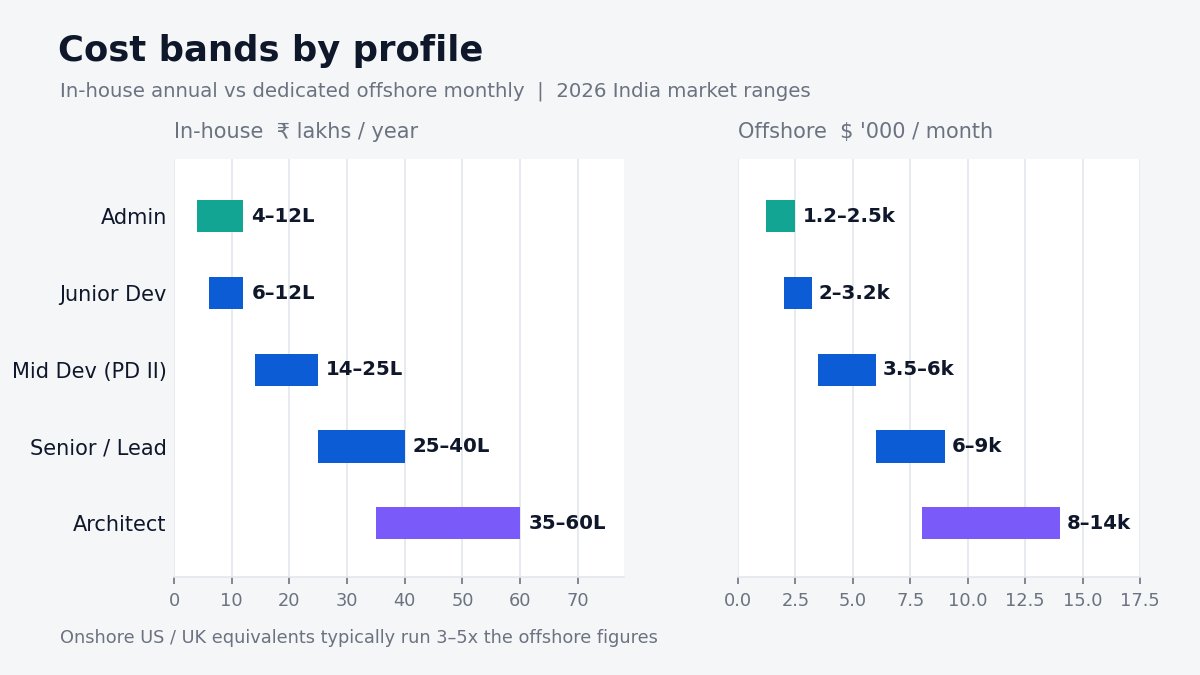
Budget bands to sanity-check scope against (India-based talent, 2026 market ranges; verify against current benchmarks at the time of hiring):
| Profile | In-house annual (₹) | Offshore monthly ($) |
| Salesforce Admin | ₹4–12 lakhs | $1,200–2,500 |
| Developer (0–3 yrs, PD I) | ₹6–12 lakhs | $2,000–3,200 |
| Developer (4–7 yrs, PD II) | ₹14–25 lakhs | $3,500–6,000 |
| Senior / Lead Developer | ₹25–40 lakhs | $6,000–9,000 |
| Solution / Technical Architect | ₹35–60+ lakhs | $8,000–14,000 |
If the first 90-day deliverable is a two-way ERP integration and the budget lands in the admin column, the scope and the budget are describing different projects. Resolve that before you interview anyone. When the requirement is genuinely coded work, you are looking to hire Salesforce developers not to expand admin capacity.
Phase 2 Sourcing and Vetting: The Part That Actually Decides Outcomes
Certifications are the entry filter, not the evaluation. Treat them as a floor. Most teams that hire Salesforce CRM developers stop at the certification check, and that is precisely where mis-hires originate.
Salesforce certifications explained the two tracks, and what each one actually proves:
- Admin track: Administrator (baseline), Advanced Administrator, Platform App Builder (declarative build capability), Business Analyst.
- Developer track: Platform Developer I (table stakes proves syntax familiarity, not judgement), Platform Developer II (the meaningful one; includes a practical programming assignment), JavaScript Developer I (relevant for LWC-heavy work), OmniStudio Developer, Marketing Cloud Developer.
- Architect track: Application Architect and System Architect are aggregate credentials earned by stacking domain certs Integration, Data, Sharing and Visibility, Identity and Access Management, Development Lifecycle and Deployment. Certified Technical Architect requires a live board review and is genuinely rare.
- Superbadges beat certifications as a signal. Apex Specialist, Advanced Apex Specialist and Lightning Web Components Specialist are hands-on and cannot be passed by memorising a question bank. A candidate with PD I plus Advanced Apex Specialist is a better bet than one with PD I alone.
- Trailhead rank means nothing. Ranger status measures time spent, not capability.
The five-question technical screen for non-technical hiring managers . You do not need to grade the answer’s correctness you need to hear whether the answer is specific:
- “Name a governor limit you’ve personally hit in production, and how you fixed it.” A real developer answers in 30 seconds with a story. This is the single most predictive question in the set.
- “Walk me through the order of execution when a record is saved.” Hesitation here means they have never debugged a trigger-plus-flow conflict.
- “How do you write a test class for code that makes an outbound callout?” The words “mock” or “HttpCalloutMock” should appear.
- “Describe your last deployment, start to finish.” Listen for a repository, a branch, a pipeline. “Change sets” as the only answer is a capability ceiling.
- “When would you deliberately choose Flow over Apex?” A strong developer argues for declarative tooling. Anyone who codes everything will build you an unmaintainable org.
Red flags, drawn from engagements Supersourcing has run on this platform:
- SOQL written inside a for loop during a live exercise. Non-negotiable failure is the most basic bulkification error.
- Test classes that rely on SeeAllData=true. It means their tests depend on org data and will fail on a fresh sandbox.
- Deep resume history entirely within one small org. Ten years in a single 200-user org with no managed packages is not ten years of range.
- Claims of PD II but no ability to describe the practical assignment they submitted.
- Cannot explain the difference between with sharing and without sharing, or why it matters. This is a security competency, not trivia.
The vetting sequence that works: CV and certification verification → 30-minute structured screen using the five questions → a 90-minute paid practical exercise in a scratch org, reviewed by an existing senior engineer → a client-side culture and communication round. Skipping the practical is the single most common cause of a bad Salesforce hire, because Apex fluency and Apex judgement look identical on a CV.
Phase 3 Engagement Models and Contract Terms
Four viable models, each with a distinct failure mode. Vendors bundle all four under the label Salesforce development services, so read the delivery model in the contract rather than the name on the proposal. The model you hire Salesforce CRM developers under shapes your risk profile far more than the hourly rate does.
- In-house full-time employee. Highest control and lowest long-run cost per hour. Slowest to start Indian notice periods run 30–90 days, and senior Salesforce profiles are usually at the top of that range.
- Staff augmentation / dedicated developer. A named engineer working under your process and your sprint board, contracted through a partner. Fastest realistic start for coded work; this is where most mid-market Salesforce hiring lands. Reliable IT staffing services supply the profile without you running the sourcing funnel.
- Project-based with a consulting partner. Fixed scope, fixed price, partner-owned delivery. Good for a bounded implementation, poor for continuous product work every change becomes a change order.
- Freelance / marketplace. Cheapest headline rate, highest variance. Acceptable for isolated, low-risk components. Unacceptable where the work touches security, data model, or anything that must be maintained after the engagement ends.
Contract terms to fix in writing before kickoff:
- IP assignment, explicitly covering Apex code, metadata, and any documentation produced. Salesforce metadata is a grey area in weak contracts.
- NDA plus a data-handling clause. If the developer will work in a full sandbox containing production data, sandbox seeding and masking obligations belong in the contract, not in a Slack message.
- Repository ownership. The repo lives in your organisation from day one. This is the term most often skipped and most often regretted.
- Replacement terms with a stated window. In the model we operate, an unsuitable hire is replaced within 7–10 working days, and that timeline is contractual rather than aspirational.
- Notice period and knowledge-transfer obligations: a minimum 30-day exit with documented handover, or you inherit an undocumented org.
- Definition of done, including test coverage floor and code review requirement. Without it, “complete” means “it worked in the developer’s sandbox.”
The negotiation point buyers miss: rate is not the lever worth fighting over ramp-time responsibility is. Ask whether onboarding days are billable. A partner confident in their vetting will absorb the first few days of org familiarisation. One that bills every hour of ramp has just transferred their own selection risk onto your budget.
Phase 4 Onboarding and Ramp-Up: The First Two Weeks
Ramp-up is where hiring timelines quietly die, and almost never for technical reasons.
The access friction nobody plans for. At enterprise clients, getting an external developer a named user in the UAT sandbox, plus Git and CI/CD access, routinely takes 3–8 business days because it routes through IT security and identity governance, not through the hiring manager. Someone must request Modify All Data or a comparable permission set, and that request gets reviewed. If you start this on day one, you lose the first week. Start it the day the contract is signed.
Day 1–3 checklist:
- Developer sandbox provisioned (Developer Pro or Partial Copy Developer edition sandboxes are too small for realistic LDV testing).
- SSO/named user created with the correct permission set.
- Repository access, branch naming convention, and PR template shared.
- Read-only production access for investigation, granted deliberately and logged.
- Access to the existing ERD or data dictionary. If none exists, that is the first deliverable.
Day 4–10 checklist:
- Documented walkthrough of installed managed packages and their constraints.
- Review of existing automation inventory every trigger, flow, and validation rule on core objects.
- Current test coverage number, per class, not just the org aggregate.
- First small, shippable change through the full pipeline, end to end. The goal is to prove the pipeline works, not to deliver value.
- Named business counterpart for requirement clarification. Developers blocked on questions are the most expensive idle resource you own.
The 10-day rule: if a mid-level developer has not shipped one real change through your full deployment pipeline by the end of week two, the problem is your environment or your requirements clarity not the developer. Diagnose it then, not in month two.
Phase 5 Managing Delivery Without Micromanaging
You do not need to read Apex to manage a Salesforce developer well. You need four instruments.
The delivery dashboard four metrics, reviewed weekly:
- Deployment frequency. Healthy continuous work ships weekly or bi-weekly. Monthly means either batching risk or a blocked pipeline.
- Test coverage trend. The direction matters more than the number. Coverage falling while story points rise means debt is being manufactured.
- Rework rate. Tickets reopened after being marked done. Above roughly 15% and your requirements process is the bottleneck, not the engineering.
- Production incident count attributable to releases. Should trend toward zero as the pipeline matures.
Cadence that works in practice:
- Daily async written standup blockers only, no status theatre.
- Weekly 45-minute technical review with a demo in a sandbox, not a slide.
- Fortnightly backlog grooming with the business counterpart present.
- Monthly technical-debt review: one item explicitly paid down every month.
Release discipline to insist on: every change lands via pull request with a second-pair review, deployed through the pipeline, never through the setup UI in production. Once your Salesforce release pipeline touches multiple environments and automated test gates, it is genuinely DevOps work teams at this stage often hire DevOps engineers to own it rather than taxing developer capacity with release plumbing.
Red flag: a developer who resists code review or wants direct production access. Both correlate strongly with the incidents you will be investigating in month four.
Phase 6 Scaling the Team or Exiting Cleanly
When to add headcount, and in what order. The sequencing most teams get backwards:
- One admin (config, support, licences) the foundation.
- One developer (integrations, Apex, LWC) added when the coded backlog exceeds roughly one full sprint.
- A second developer or a QA engineer QA usually first, because a single developer reviewing their own work is your largest quality risk.
- A solution architect needed at roughly three or more implementers, or when multi-cloud design decisions appear.
- A release manager or DevOps owner when environment count and deployment frequency make manual coordination the bottleneck.
A dedicated Salesforce development team only outperforms individual hires once there is an internal owner to point it at, otherwise you have bought throughput without direction.
The wrong scaling move: hiring a second developer to fix delivery speed when the actual constraint is unclear requirements or manual releases. Doubling engineering capacity against a broken pipeline doubles the queue in front of the pipeline. For teams scaling past four or five Salesforce roles, structured recruitment process outsourcing removes the sourcing bottleneck without adding internal recruiter headcount.
The offboarding checklist run this before the last day, not after:
- All code merged to main; no work living only in a local branch or a personal sandbox.
- README and deployment runbook are current enough that a new developer can deploy without asking.
- Named-credential and integration-user inventory, with owners and rotation dates.
- Scheduled jobs and batch classes documented, including what breaks if they stop.
- Access revoked across org, repo, and CI tooling a checklist item, not an assumption.
- A recorded 60-minute architecture handover walkthrough. This single artefact saves 2–3 weeks of the next person’s ramp.
Case Studies: Hiring Velocity Under Real Constraints
Salesforce roles compete in the same talent market as every other specialised engineering skill, and the constraint is almost always sourcing throughput rather than willingness to pay. Three engagements that illustrate the mechanics metrics first.
100+ engineers hired for Paytm. A fintech scaling engineering headcount at that volume cannot run sequential hiring; the funnel has to be parallelised across roles with a shared vetting bar, or standards drift as urgency rises. Supersourcing supported Paytm through a hiring programme exceeding 100 engineers, holding a consistent technical screen across every requisition. The transferable lesson for Salesforce hiring: the vetting rubric has to be written down and reused, because the moment screening becomes interviewer-dependent, your third hire is not held to the standard your first hire was.
Recruitment automation for Somnoware. A healthtech operating under clinical data-handling requirements needed hiring throughput without loosening compliance screening the same tension you hit when a Salesforce developer needs full-sandbox access to data governed by HIPAA or DPDP. Automating the repeatable stages of the funnel is what preserves capacity for the judgement-heavy stages, which in Salesforce hiring means the practical exercise and the security-competency questions.
Engineering scale-up at Swiggy. High-growth consumer platforms need engineers who can hold quality standards while shipping fast, and the hiring cycle has to keep pace with product cycles. Sustained delivery through a hyper-growth phase depends on candidate joining reliability, an accepted offer that does not convert costs more than a rejected one, because the requisition reopens weeks later with the original timeline already spent.
Composite pattern, anonymised a Salesforce-specific engagement type we see repeatedly: a mid-market SaaS company with a five-year-old org, 20-plus record-triggered flows, sub-40% Apex test coverage and change-set-only deployments. The correct first hire is never a second admin. It is one mid-to-senior developer whose first 60 days are spent on a pipeline and a test-coverage floor rather than features a sequencing choice that feels slow for eight weeks and then permanently raises release velocity.
Decision Framework: Which Role, Which Model
Two tables. Use the first to classify the work, the second to choose how to buy it. Both apply whether you hire Salesforce CRM developers in-house or through a partner.
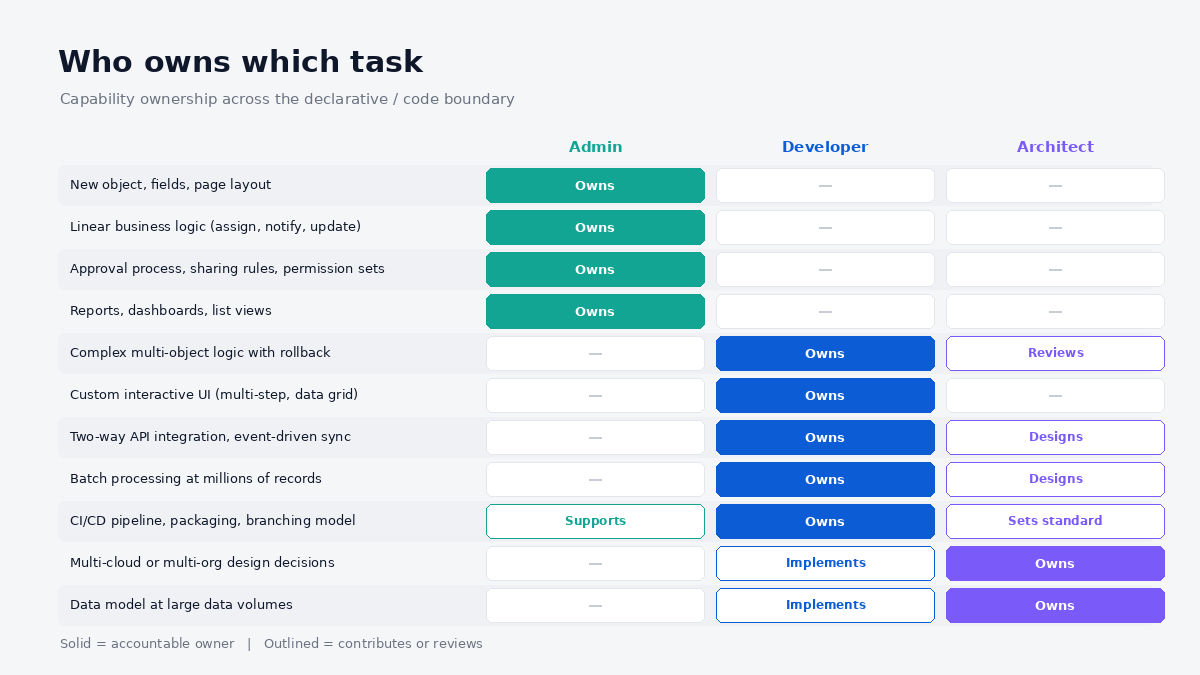
Table 1 Who owns which task
| Requirement | Admin | Developer | Architect |
| New object, fields, page layout | Owns | – | – |
| Linear business logic (assign, notify, update) | Owns | – | – |
| Approval process, sharing rules, permission sets | Owns | – | – |
| Reports, dashboards, list views | Owns | – | – |
| Complex multi-object logic with rollback | – | Owns | Reviews |
| Custom interactive UI (multi-step, data grid) | – | Owns | – |
| Two-way API integration, event-driven sync | – | Owns | Designs |
| Batch processing at millions of records | – | Owns | Designs |
| CI/CD pipeline, packaging, branching model | Supports | Owns | Sets standard |
| Multi-cloud or multi-org design decisions | – | Implements | Owns |
| Data model at large data volumes | – | Implements | Owns |
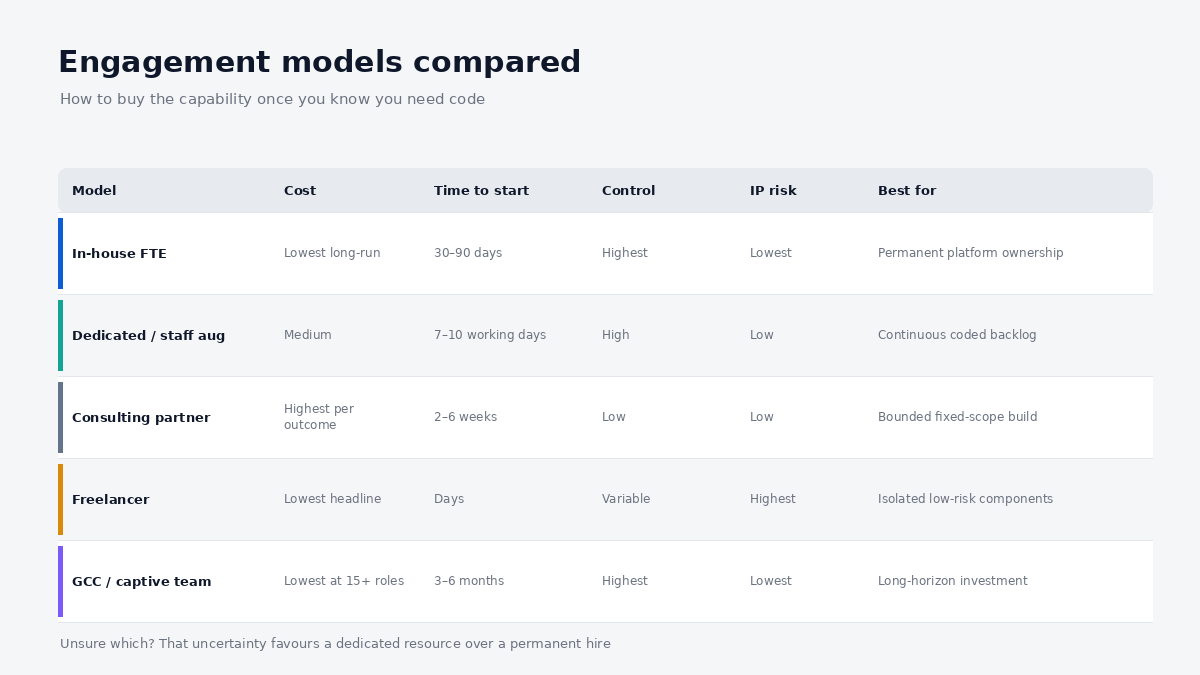
Table 2 Engagement models compared
| Model | Cost (rel.) | Time to start | Control | IP/security risk | Best for |
| In-house FTE | Lowest per hour, long-run | 30–90 days (notice periods) | Highest | Lowest | Permanent platform ownership |
| Dedicated / staff augmentation | Medium | 7–10 working days to shortlist | High your sprint, your board | Low with proper NDA/IP terms | Continuous coded backlog, fast start |
| Consulting partner, project-based | Highest per outcome | 2–6 weeks | Low partner-managed | Low, but knowledge leaves | Bounded implementation, fixed scope |
| Freelancer | Lowest headline | Days | Variable | Highest | Isolated, low-risk components |
| GCC / captive team | Lowest at scale (15+ roles) | 3–6 months to establish | Highest | Lowest | Long-horizon multi-team platform investment |
The decision rule, in one line: if the coded backlog is continuous and you intend to own the platform for years, hire in-house and bridge the notice-period gap with a dedicated developer; if the work is a bounded project, buy the project; if you are unsure which, that uncertainty is itself the signal to start with a dedicated resource rather than a permanent one.
 What Most Teams Get Wrong
 What Most Teams Get Wrong
The most expensive error in Salesforce staffing is not hiring an admin instead of a developer. It is hiring a developer and giving them admin work then concluding from the resulting mediocre output that senior Salesforce talent is overrated. A strong developer spending 70% of their week on field creation and report requests will disengage within a quarter, and they will leave with the only working knowledge of your integrations.
Four more patterns worth naming:
- Treating Flow as free. Declarative automation has no test coverage requirement, so it feels cheaper. It is not cheaper, the cost is deferred and paid in debugging time. A 60-element flow with no version history is technical debt that does not appear in any dashboard.
- Buying certifications instead of judgement. The certification market has an active dumps problem, which makes Platform Developer I close to non-discriminating on its own. Hands-on superbadges and a paid practical exercise separate candidates that credentials cannot.
- Under-scoping integrations by 3–4x. Restating this because it is the most consistent budget failure in the category: the callout is 20% of the work. Auth, mapping, error handling, retries, idempotency and reconciliation are the other 80%, and they are invisible in the original requirement.
- No named platform owner. Orgs with three or more contributors and nobody accountable for architecture converge on the same end state: duplicated logic, conflicting automation, and a data model nobody can explain. This is an ownership failure, not a talent failure, and hiring more implementers accelerates it.
The contrarian take: the best first Salesforce hire for most mid-market companies is not a developer at all; it is a strong admin plus a fractional architect for design decisions, with a dedicated developer brought in only when the coded backlog is provably continuous. Companies that hire Salesforce CRM developers before establishing that continuous need pay senior rates for junior-appropriate work for two to three quarters before correcting.
Cost and Timeline Reality Check
Concrete ranges, based on 2026 India-market observation. What it costs to hire Salesforce CRM developers depends less on the seniority label than on cloud scope and the condition of the org they inherit. Treat them as planning bands and verify against current benchmarks at the time you hire compensation data for this role varies widely by city, cloud specialisation and certification depth.
Cost tiers
| Tier | In-house (₹/year) | Dedicated offshore ($/month) | Blended hourly ($) | What you get |
| Admin | ₹4–12 lakhs | $1,200–2,500 | $10–20 | Config, support, licences, reports |
| Junior Developer | ₹6–12 lakhs | $2,000–3,200 | $15–25 | Supervised Apex, LWC under review |
| Mid Developer (PD II) | ₹14–25 lakhs | $3,500–6,000 | $25–40 | Independent Apex, integrations, LWC |
| Senior / Lead | ₹25–40 lakhs | $6,000–9,000 | $40–60 | Design ownership, review, mentoring |
| Architect | ₹35–60+ lakhs | $8,000–14,000 | $60–90 | Multi-cloud design, governance |
US and UK onshore equivalents typically run 3–5x the offshore figures for comparable capability, which is why cost arbitrage remains the primary driver of offshore Salesforce hiring. At 15 or more platform roles the arithmetic shifts again, and a global capability center becomes cheaper per head than sustained vendor staffing though the 3–6 month establishment period rules it out as a solution to an urgent gap.
Timelines by scenario
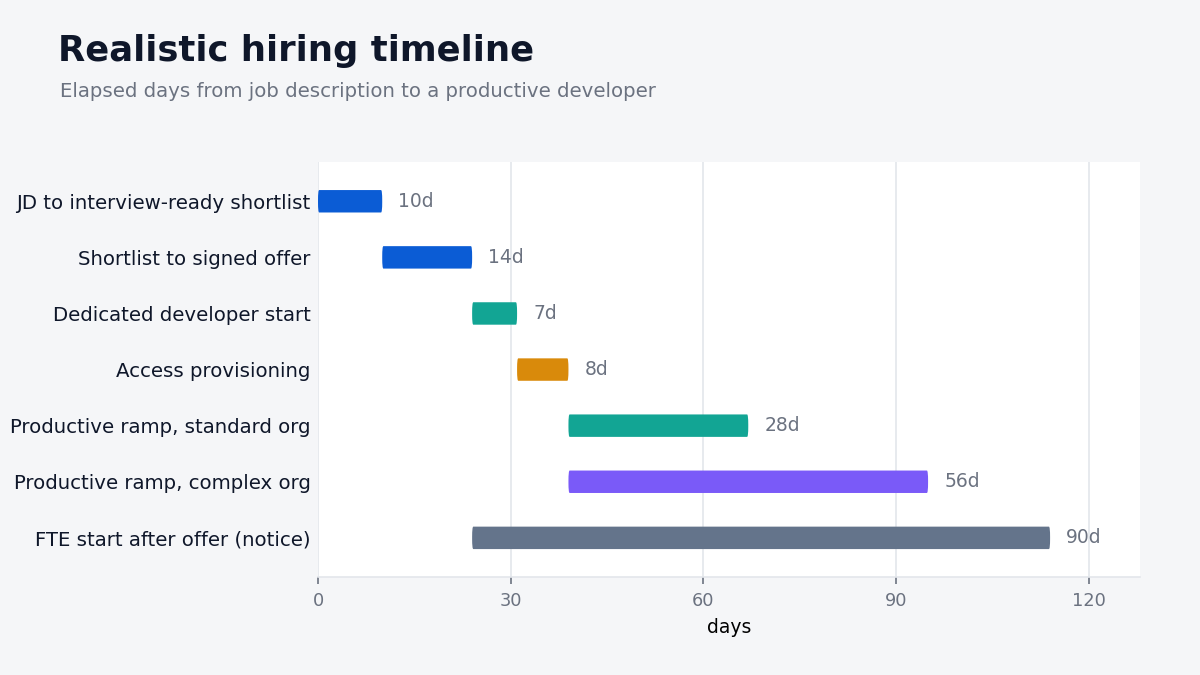
| Scenario | Realistic timeline |
| JD to interview-ready shortlist (dedicated model) | 7–10 working days |
| Shortlist to signed offer | 1–2 weeks |
| FTE start date after offer (India notice period) | 30–90 days |
| Dedicated developer start after contract | 2–7 days |
| Access provisioning at an enterprise client | 3–8 business days |
| Productive ramp, standard org | 2–4 weeks |
| Productive ramp, heavily customised org with managed packages | 6–8 weeks |
| First shipped change through full pipeline | Within 10 working days of access |
What drives cost up: multi-cloud scope (especially Revenue Cloud/CPQ and Marketing Cloud), managed-package complexity, regulated-data handling requirements, sub-24-hour response SLAs, and any requirement for onshore timezone overlap beyond four hours.
What drives cost down: a clean and documented org, existing CI/CD, a clear 90-day deliverable, engagement lengths of six months or more, and flexibility on seniority where the work genuinely allows a mid-level developer with senior review.
Where to Take This Next
If you are mid-decision, the useful next step is not a vendor call, it is finishing the Phase 1 classification exercise. Sort your Salesforce backlog into configuration, code and design. That single sheet tells you whether you need an admin, a developer, an architect, or a design conversation before any hire at all, and it makes every subsequent quote comparable.
Once you know the answer is coded work, the constraint becomes sourcing: finding people whose Apex judgement matches their certifications, and confirming it before they touch your org. That is the part worth outsourcing to a team that runs Salesforce-certified vetting daily, including the practical exercise and the security-competency screen most internal processes skip. When you hire Salesforce CRM developers through a partner, that vetting layer is the product you are actually buying. Supersourcing’s model surfaces vetted profiles within 7–10 working days, with replacement inside the same window if a hire is not the right fit.
Bring your classified backlog and the org details from the Phase 1 checklist to a short scoping conversation talk to the team here. If the answer is that you need an admin rather than a developer, that is a legitimate outcome of the conversation and a cheaper one for you.
FAQ
Can a Salesforce admin write Apex code?
Some can, and many experienced admins write simple triggers competently. The gap is rarely syntax; it is bulkification, test design, governor-limit awareness and deployment discipline. An admin writing occasional Apex without code review is the most common source of production incidents we see, because the code works at one record and fails at two hundred.
Do I need a Salesforce developer or an admin?
Sort your backlog into configuration, code and design buckets. If configuration dominates, hire an admin to cover 70–80% of ticket volume in a typical org. Hire a developer once coded items consistently exceed a sprint’s worth of work, or the moment an integration or custom interface appears in scope.
How much does it cost to hire Salesforce CRM developers in India?
Mid-level certified developers typically land at ₹14–25 lakhs annually in-house, or $3,500–6,000 per month through a dedicated offshore model. Senior and architect profiles run materially higher. Multi-cloud specialisation, particularly CPQ and Marketing Cloud, carries a premium of roughly 20–40% over core platform work.
How long does it take to hire a Salesforce developer?
A structured process reaches an interview-ready shortlist in 7–10 working days. The variable is the start date, not the shortlist: dedicated resources begin within a week of contract, while full-time employees in India serve 30–90 day notice periods. Budget separately for 3–8 business days of access provisioning.
Is Flow replacing Apex?
Flow has absorbed a large share of what previously required code, and Salesforce has retired Workflow Rules and Process Builder in favour of it. But Flow cannot manage transaction rollback across objects, chain asynchronous jobs, make authenticated callouts with retry logic, process millions of records statefully, or carry unit tests. The declarative surface is expanding; the boundary has not disappeared.
What certifications should a Salesforce developer have?
Platform Developer I is the entry filter. Platform Developer II is the meaningful credential because it includes a practical assignment. For LWC-heavy work, add JavaScript Developer I. Weight hands-on superbadges Apex Specialist, Advanced Apex Specialist above additional multiple-choice certifications when comparing two candidates.
What’s the difference between a Salesforce developer, consultant and architect?
A consultant translates a business process into platform design and is often the right first external hire. A developer implements what cannot be configured. An architect owns cross-cloud and data-model decisions and reviews both. Roughly one architect for every three implementers is a workable ratio; below three, buy architecture fractionally.
How do I evaluate a developer if nobody on my team is technical?
Use the five-question screen in Phase 2 and grade for specificity rather than correctness vague answers to the governor-limit question are disqualifying on their own. Then insist on a paid practical exercise reviewed by an external senior engineer. If you have no access to one, that review is worth buying; it costs a fraction of a mis-hire. This is also a reasonable point to bring in a partner whose vetting layer already includes that review.
